


Home User Forums SongKong Music Tagger Jaikoz Music Tagger Albunack Music Service
Showing posts with label aiff. Show all posts

Wednesday, 4 November 2015

What's the best lossless format?

What's the best lossless format?

Most of us know that generally lossless is better than lossy because it retains all of the audio and therefore sound better, and you can also convert form one lossless format to another without losing any sound quality. Lossless does require significantly more disk space but his doesn’t mean you have to reduce the amount of music stored on your iPod, iPhone or mobile device. For example iTunes allows users to convert higher data rate music files to 128kbps AAC on the fly as the music is synced to the mobile device in question. 

But what Lossless format should you choose ?

Currently there are four widely available choices:
  • Aiff
  • Wav
  • Apple Lossless
  • Flac

Wav

WAV is a music file format developed by Microsoft and IBM capable of storing Linear PCM audio (the digital encoding format used on compact discs) in completely uncompressed form. Ripping a CD and storing it as an uncompressed WAV results in “bit perfect” storage; the ripped music file is identical to the original CD data package. WAV files can also store high-resolution music files at greater bit depths and sampling rates than CD’s 16-bit/44.1kHz resolution. Uncompressed WAV files can be ripped and played back in iTunes and are very high quality. However, they do take up more hard drive storage space then lossless compressed formats such as Flac or Apple Lossless

WAV files originally did not support metadata, there is now defacto support using ID3v2 - the same format that is used by Mp3s. However not all players and tools currently recognize ID3v2 metadata in Wavs.

Aiff

AIFF was developed by Apple and is very similar to WAV. Again it is capable of storing uncompressed Linear PCM audio. Ripping a CD and storing it as uncompressed AIFF results in “bit perfect” storage with the ripped music file identical to the original data on the CD. Like WAV files, AIFF files can also store high-resolution music files at high bit depths and sampling rates. 

AIFF uses ID3v2 like Wavs and Mp3s. ID3v2 metadata is within Aiff is much more widely recognized - notably it is properly supported in iTunes.
 

Apple Lossless

This is a newer Apple file format option that employs lossless compression, which reduces the stored data to as little as half of the original music file’s size but restores bit-for-bit identical to the original music file on playback. The process is not unlike a zip file in which a large amount of data is “zipped” down to a smaller file size for storage and “unzipped” to its full size when opened.

There is discussion about whether uncompressed  music  files  such  as  WAV  or AIFF can sound better than lossless compression formats like Apple Lossless or FLAC because they don’t require the additional  step  of  being  “unzipped”  and  restored  to  their  original  PCM data package during real-time during playback, but this difference should only be noticeable in older and slower hardware.

Apple Lossless offers full metadata support using its own metadata format, this metadata format is also used by Apples lossy Advanced Audio Coding format. Both formats can be found using the .mp4 or or .m4a format which can be confusing

FLAC (Free Lossless Audio Codec)

FLAC is an open source lossless compression format similar to Apple Lossless Compression, this reduces the stored music file’s size, but then restores the data package bit-for-bit identical to the original music file on playback. It supports high-resolution audio with greater bit depths and sample rates and also supports metadata tagging using Vorbis Comments.

The main problem with FLAC is that although it is  an extremely common and accepted format, it is not supported by iTunes and Apple hardware such as the iPod.

Conclusions

 I would love to recommend the open source FLAC format but because of its poor support in the Apple ecosphere  I don't think it is currently the best choice, particularly since Apple punches above its weight when it comes to digital music.

Although Wav audio format is well supported, support for its metadata is poor so again I would not recommend Wav.

So we are left with two Apple formats. With Apple Lossless we get a smaller filesize and good metadata support, with Aiff we get a larger filesize but even better metadata. Both are well supported on Apple and non Apple hardware and software. The ID3v2 format used by Aiff format has been around a long time (because used by Mp3 as well)  and although it is a little unwieldy it is well understood and very powerful, the metadata format used by Apple Lossless is not as well understood or flexible.

Everybody circumstances differ but for me the current best choice is Aiff


Jaikoz 8.4.0 now with full Aiff and Wav support

 Jaikoz 8.4.0 now supports reading and writing metadata to Aiff and Wav formats !

Aiff and Wav Support 

Aiff and Wav formats each provide an uncompressed lossless format for your audio and were created in 1988 and 1991. However until more recently there was no agreed way to store anything but the bare minimum of metadata, this is why we originally didn't add support within Jaikoz. The other reason was these formats were expected to die out and be replaced with newer formats but although they are less prevalent then before this has not happened.

However we revisited these formats and discovered that defacto support for Aiff tagging and Wav tagging now existed using an ID3v2 chunk, just like MP3 files. Because they use ID3v2 they can now store all the metadata that Jaikoz finds such as artwork, composers, bpm and  MusicBrainz and Discogs identifiers - not just the basic metadata such as artist and album.

This also means you can edit your Aiff and Wav metadata not just with the Edit tab but also using the ID3 Edit tab. The ID3 Edit tab shows hows exactly how the fields are stored and also gives access to any additonal ID3 fields that are not mapped to a generic field in the Edit tab.


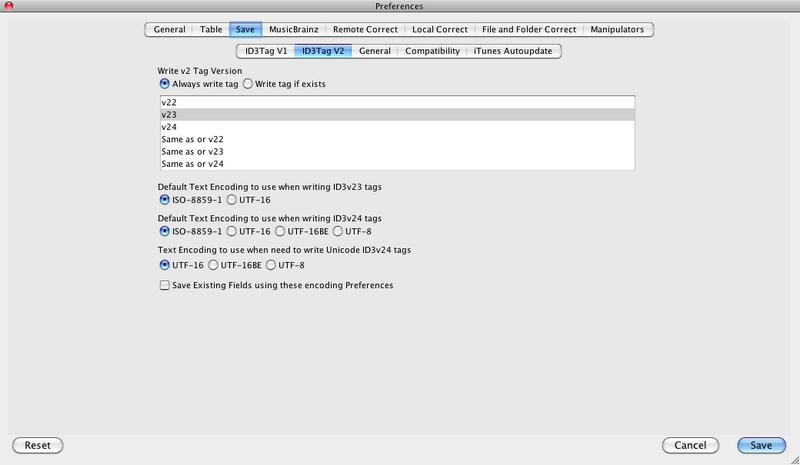
You can also decide on the ID3v2 format to use, by default they will use the value of Preferences:Save:ID3Tag V2:Write V2 Tag Version


But you can override this for any individual file by selecting a different value from the
Version column.


Single Song Matching

We also make some improvements to single song matching. Single song matching occurs when a song has been not been grouped with any others songs or no match was found for the group of songs and user preferences allow Jaikoz to try and match each song individually. Because only one song is being matched any album containing the song is a potential good match but we have made some changes to find a match for an original album rather than a compilation whenever possible.

Full list of fixes is as follows:

Bug

  • [JAIKOZ-1070] - Should not bother trying to do release metadata match unless have artist and release
  • [JAIKOZ-1079] - Saving Acoustids gets confused if filename has been modified but not saved
  • [JAIKOZ-1085] - Too many files exception when matching

Improvement

  • [JAIKOZ-290 ] - Add support for AIFF format (which might use ID3v2 format for metadata)
  • [JAIKOZ-1071] - When have no metadata single song matching do more to find track AND artist
  • [JAIKOZ-1074] - SingleSong match should first match by artist+title+release if have data
  • [JAIKOZ-1075] - SingleSong matcher should filter out Compilation acoustid matches
  • [JAIKOZ-1083] - Add support for Wav with RIFF
  • [JAIKOZ-1088] - Make artist and track search fuzzy match tracks

Tuesday, 13 October 2015

Aiff and Wav tagging now available

SongKong now supports reading and writing metadata to Aiff and Wav formats !

AIFF and WAV formats each provide an uncompressed lossless format for your audio, whereas Flac and Apple Lossless provide a compressed lossless format. Both types can encode your audio without losing any of the original data. An uncompressed format does not need to be uncompressed during playback, which can potentially result in smoother playback but at the expense of larger file sizes, however with most hardware it is unlikely you could detect any difference in playback . To confuse matters a little it is now possible to store compressed lossless in Aiff and Wav files as well - but this is rarer and not part of the original specification.

Audio Interchange File Format (AIFF) was developed by Apple Inc. in 1988 and is most commonly used on Apple Mac systems. Waveform Audio File Format (WAV) is a Microsoft and IBM audio file format standard for storing an audio bitstream on PCs developed in 1991. Both are version of the Interchange File Format (IFF) format developed by Electronic Arts back in 1985.

All formats provide a way of storing data in chunks - however until recently there was no agreed way to store anything but the bare minimum of metadata, this is why we never added support within Jaikoz. The other reason was these formats were expected to die out and be replaced with newer formats but although they are less prevalent then before this has not happened.

However we revisited this and discovered that defacto support for aiff tagging and wav tagging now existed using an ID3v2 chunk, just like MP3 files. Because they use ID3v2 they can now store all the metadata that SongKong finds such as artwork, composers, bpm and  MusicBrainz and Discogs identifiers - not just the basic metadata such as artist and album. Wavs can store metadata in an ID3v2 chunk and also some basic metadata in an INFO chunk: for maximum compatibility with older applications SongKong adds both an ID3v2 and a INFO chunk to files when they are saved.

After a period of development and testing support has now been added to SongKong 3.18 and this is available from today, plus as usual we have some matching improvements and some additional fixes.

Support for these new formats will be added to Jaikoz within a few weeks.
Jthink blog Jthink Facebook page google_plus Jthink YouTube channel Email Paul at Jthink Subscribe to Weekly Newsletter