




Home User Forums SongKong Music Tagger Jaikoz Music Tagger Albunack Music Service
Showing posts with label classical. Show all posts

Tuesday, 17 October 2017

Jaikoz 9.3.0 Release with new metadata fields

Today on October 17th 2017 we are pleased to announce a new release of Jaikoz. 

The focus of this new release is the addition of some new metadata fields plus some fixes related to metadata editing, it can be downloaded from here
 

MinimServer Grouping


MinimServer is a powerful uPNP server that can be used to stream to uPNP devices, it is typically used to stream music from high end audio systems but can also be used just as successfully on a PC or Mac. It has a way to group tracks that is especially useful for classical music with the MinimServer Group field (note this is different to the more common Grouping field).  We already had support for automatically updating this custom field with SongKong. We now support automatic updating with Jaikoz, and of course with Jaikoz you can manually edit the field as well.


Overall Work

Jaikoz already had support for the Work field. Typically with classical music tracks represent movements that are part of a Work. But sometimes that Work is part of a larger work, most notably Operas that have recordings linked to Scenes that are parts of Acts, that are part of the overall Opera.

Now the all encompassing work is stored as the Overall Work 


Instrument

Jaikoz already adds performers and their instruments when matching the releases on MusicBrainz and Discogs. This information is stored in the Performer field in the form Person:Instrument for ID3 formats such as Mp3 and Wav, and Person (Instrument) for VorbisComment formats such as OggVorbis and Flac.

But now we add the person only to the PerformerName field and the Instrument only to the Instrument field. This means you can easily sort or index your music by the instruments used.


ISWC and IPI

In a similar way to how the ISRC field can identify a unique recording the ISWC field can identify a unique work. Artists and labels can have an IPI, this is used to identify the interested parties of an ISWC (such as the composer of the work). We have now added ISWC and IPI fields to Jaikoz that can currently be manually edited, in a future release we will automatically add the metadata from MusicBrainz.


Single Disc Track No  

For Multi-Disc releases it is sometimes useful to just consider the releases as a single disc release. This is the purpose of the SingleDiscTrackNo release, Jaikoz automatically adds this data when releases are matched to MusicBrainz.

This field can be used in music players instead of the TrackNo to view albums as single disc albums.


Lyricist Sort

We already have sort fields for most people, such as the composer, conductor. Now we added a sort field for the lyricist.




Other Fixes

There are also a number of fixes, mostly related to some issues with advanced editing of some fields with Jaikoz. The full list of fixes can be found here


Tuesday, 1 August 2017

Jaikoz 9.2.0 released on July 31st 2017

Today we release a new version of Jaikoz.

This has some important improvements and fixes. 


AcousticBrainz Direct Lookup

Before this release Jaikoz always used a cached copy of all the AcousticBrainz metadata on Albunack. So if a MusicBrainz song had been analysed with AcousticBrainz to determine its acoustic properties (such as its BPM or the key it is played in) that information could be added to that song with Jaikoz. But AcousticBrainz have not been making the new data available so now we have switched Jaikoz to lookup AcousticBrainz directly.

This should mean that you can now update many more of your songs with AcousticBrainz metadata.

Classical Lists 

In this release we have have improved the algorithm that identifies if a release is Classical or not. But we realize that some releases are difficult to categorize so we we have added modifiable Classical lists

One way that Jaikoz identifies classical releases is looking for releases that have credits to particular people known to work only on Classical music. This list is available within classical_people.txt, here is a small section, each line has the MusicBrainz Artist Id and then Artist Name

               1f9df192-a621-4f54-8850-2c5373b7eac9 = Ludwig van Beethoven
               d01c08ad-f09f-4396-b8a7-e27ae146ea27 = Ludwig von Széchényi
               5a4ae8d0-7ee4-4e83-bb89-1cfc9cf63d8b = Ludwik Osiński
               676bf1b0-b834-4117-86d2-ceba42fac051 = Luigi Badia
               688986c3-da7b-4465-92cb-f4736c94f2cd = Luigi Balestra
               cc272df6-a476-4d30-9ede-a47db04d8813 = Luigi Bassi
               5c1a3f8f-d5e5-4dcd-9e44-9443f06bb77d = Luigi Boccherini
               d6077dc7-7bdb-4cc8-9425-fb80bf2dff41 = Luigi Caracciolo
               375d52ad-5b7a-4f96-80e2-6d9ad13f5160 = Luigi Cherubini
               63b22cde-9b11-4465-83bf-ecf374eb490e = Luigi Gordigiani
           
The term Classical is used here in the most general sense so that anyone who died before music could be recorded is included plus Classical composers and conductors of the 19th and 20th century, in total there are about 6000 people listed. If you are finding that certain releases credited to a particular person are being classified as Classical when you do not want them to be you can search this file for that person and remove that line, you can also add people to this file using the format MusicBrainz Artist Id = Name

The first time you start Jaikoz the classical_people.txt file is copied from the installation folder into the user preferences folder, and this is the file that Jaikoz will uses so you'll need to edit the file in this location for it to have any effect. For OSX this is Library:Preferences:Jaikoz, for Windows it is C:\Users\username\Jaikoz and for Linux it is $HOME/.jaikoz/prefs

There is also a classical_composers.txt file, like all automated music taggers Jaikoz is always dealing with incomplete databases, a particular problem for classical music is that the database may have the list of credits for a release but not their particular role, e.g. Is Person B a composer, performer or conductor. Jaikoz has created a list of people who principal activity is composing so when we find this person credited on a release we can usually assume that they are the composer even if they do not have a composer credit on that particular release.

The smaller classical_conductors.txt list works the same way for conductors, both these files can be edited in the same way as the classical_people.txt file in order to fine tune your classical metadata requirements. If a person is a composer and conductors (or performer) then they will not be included in the composer/conductor list unless the vast majority of their credits are for one particular role.

The not_classical_release.txt list is an exception list to specify releases that should never be considered a Classical release. Some releases are borderline Classical and Jaikoz algorithm can sometimes get it wrong, adding a MusicBrainz Release Id and a title to this list ensures that Jaikoz does not treat these releases as classical when using its identify classical algorithm.

Note, none of these files can be edited directly with Jaikoz itself, just use your favourite text editor.


Bug: Multiple PERFORMERS not being saved to Flac

This field can often have multiple values, but there was a bug preventing multiple values from being saved for the FLAC format


Bug: Windows 1730 God Mode Bug

A bug in Java was exposed by a new release of Windows, Oracle have now fixed Java and this version of Jaikoz has been updated to use this version.


Bug: Classical Album with two different album artists set for different tracks

It was possible for Jaikoz to tag Classical releases so that the album artist was not set consistently. This can cause issues for players and hence the album artist should always be set consistently over an album.


A complete list of the improvements and fixes can be found here


Monday, 12 June 2017

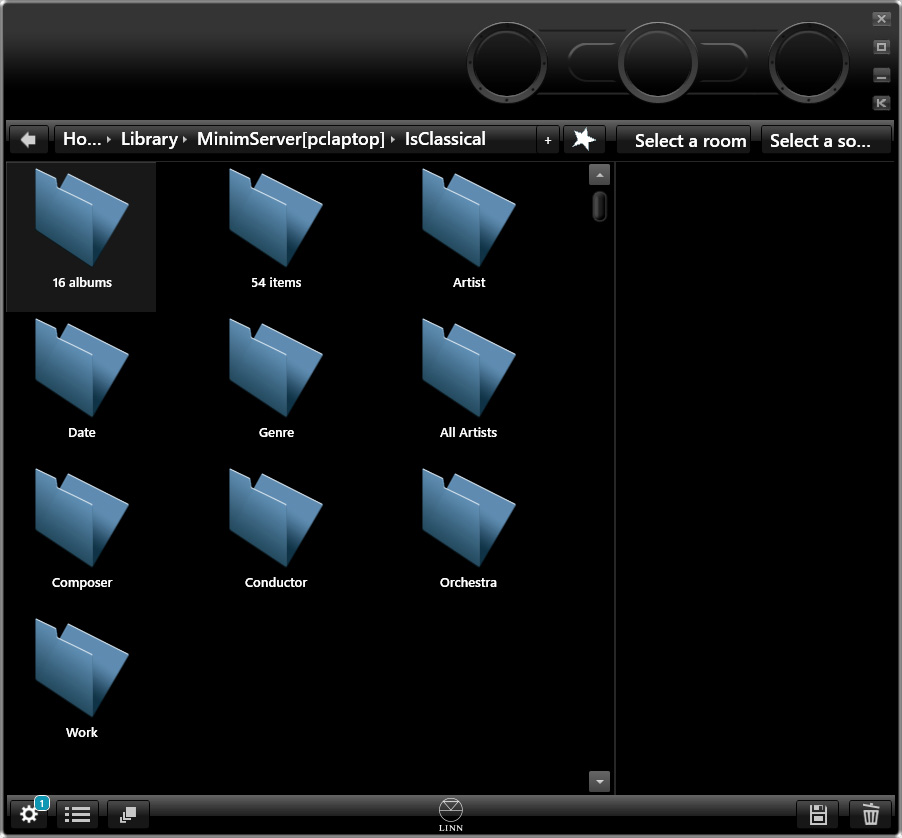
MinimServer with SongKong: Part 9: Is Classical and other boolean fields

Part 10: Multi Disc Albums
Part 8 : Configuring the Date Index

Problem:Most of us have a mixed Classical/Non Classical music library and sometimes its nice to be able to simply browse one category or the other. The way this is usually done is by using the genre field, but then this means that all our Classical music has to be given the same genre when what we probably want to do is categorize by subgenres within Classical.

Solution:SongKong music identification album categorizes albums as non-classical/classical and helpfully writes an Is_Classical boolean field to the files themselves so we can use this to split our albums into two groups for easier browsing.
  

Boolean fields in MinimServer 

A boolean value is simply a field that has only two values. So if we just add IS_CLASSICAL to indexTags we can then browse by two values 


But MinimServer provides a nice shortcut to go straight to a value by using the fieldName:MapValue:NewName syntax

e.g 

indexTags:is_classical=1:IsClassical


So now when you click on IsClassical it takes you to the classical only albums. The only trouble with the approach is that there is no no way to go to only the non-classical albums.


Browsing both values of a Boolean field

But there is a way to do this as well. It is slightly convoluted you need to add another mapping to the zero value from a pseudo field which is then populated from the original field

e.g 

indexTags:is_classical=1:IsClassical,is_classical_copy=0:IsNonClassical
tagValue:is_classical_copy.default={is_classical}


 Now we can browse by both IsClassical and IsNonClassical easily.


Thursday, 4 May 2017

MinimServer with SongKong: Part 4: Groups and Works

Go forward to Part 5: The Artist Index
Go back to      Part 3:Sorting Conductor and other fields


Groups and Compositions


Minimserver has the concept of Groups and Works (or Compositions). In its purest sense Groups are simply a way to groups tracks within a particular album. But with regards to Classical music a Group is synonymous with a work, with each track representing a movement and all movements in a a work having the same value for Group.  

In the majority of cases the Work/Composition field has the same value as the Group field but it is used for a different purpose, if added to the indexTags field it can then be indexed and browsed in the same way as the artist or album.

But some music such as Operas are more complex than a simply consisting of movements and works. Operas can consist of multiple tracks per scenes that are part of acts that then make up the Opera. When there are more than two levels the Work/Composition should usually be set to the highest level, i.e the Opera name

Groups Example

Without using groups all tracks are listed in track order when you open an album


But with groups we see the groups representing a work when you open the album. This is much clearer, we can clearly see at a glance there are two different works, String Quarter in G minor Op 10 and String Quartet in F major. This makes sense because it is more common to play the complete work rather than just one movement of the work


but you can still double click on a group to see the  movements contained within, and play individual tracks.


Configuring Groups with SongKong


So how can SongKong help? 

Although the Group field is not a standard metadata field we have added support for it in SongKong so with SongKong your identified tracks will be automatically grouped by MinimServer with no further configuration needed.

If you don't want SongKong to group fields just add to the Never modify or add these fields list.


Browsing by Works

For browsing by work SongKong provides two different possibilities. 

Browse by Overall Work


The OVERALL_WORK field lets you browse by the top level work such as the Opera name. Simply add OVERALL_WORK to MinimServer indexTag field and rescan. I have renamed it here to the more user friendly Work using the originalName:NewName syntax.


Now you can browse the Work index


Browse by Work 

Alternatively the WORK field lets you browse at a level synonymous with Group . Simply add WORK to MinimServer indexTag field and rescan. 

There are some differences between the Group field and the Work fields. Sometimes movements are not listed contiguously within an album. MinimServer does not support non-contiguous Groups, but there is no such restriction on MinimServer Works.

This article is correct for SongKong 4.8 onwards it replaces this older article


Sunday, 30 April 2017

MinimServer with SongKong: Part 6: Configuring the Track Artist for Classical music

Go forward to Part 7:Album Artist

Go back to      Part 5:The Artist index


The Track Artist 

In the context of Classical music the Track Artist only really exists as a concept in digital music. On a CD or record various different people can be involved in each track, they may be a soloist, part of an ensemble, orchestra or choir or the conductor and labelled as such, different tracks have different types of people involved. The Track Artist represents the most important people or groups involved in the performance.

The Track Artist is used in MinimServer in the All Artists index, it is only used in the Artists index when the album artist is missing.

There is no hard and fast rule about what the Track Artist should be. But SongKong lets you configure what fields to use using the MusicBrainz Track Artist option on the Classical tab. The default is Performers and Choir/Orchestra/Ensemble and Conductor - note the Composer is not included since they are not actually involved in the performance.

The conductor is involved in the performance, but since the conductor has their own standard conductor field you may decide not to add it to the track artist field.


There is also the option that just takes the first most important person/group Performers or Ensemble/Choir/Orchestra or Composer. This is quite useful if you just want to present a simpler value to MinimServer's All Artist index.


If you change your mind just change the option and rerun SongKong over your files to quickly update with the new values. Because the songs have already been identified SongKong does not have to rematch the files only update the metadata from the matched release.

SongKong does write all the individuals and groups to different fields as well so you can easily configure MinimServer to index performers, ensembles, choirs and orchestras as well. In fact, you may prefer not to include the All Artists index at all and just index the different types of people and group that can be included in the Track Artist field

Within MinimServer you would want to add the following

indexTags:Choir, Conductor, Ensemble, Orchestra, Performer_name:Performer

itemTags:choir_sort, conductor_sort,ensemble_sort, orchestra_sort, performer_name_sort

tagValue:Choir.value.sort={choir_sort}, Conductor.value.sort={conductor_sort},Ensemble.value.sort={ensemble_sort},Orchestra.value.sort={orchestra_sort},Performer_name.value.sort={performer_name_sort}

Note we use the Performer_name field instead of the Performer field since the Performer also includes instrument. But we rename the field to Performer using the OriginalName:NewName syntax so more user friendly. When configuring it's sort value in the tagValue field we have to refer it to by its original name (Performer_Name) rather than its new name (Performer).


Next time we look at the Album Artist
Jthink blog Jthink Facebook page google_plus Jthink YouTube channel Email Paul at Jthink Subscribe to Weekly Newsletter