Home User Forums SongKong Music Tagger Jaikoz Music Tagger Albunack Music Service

Wednesday, 9 June 2021

SongKong 7.4 Dawnrazor released June 9th 2021

We are pleased to announce the release of SongKong 7.4 Dawnrazor. 


This release contains a number of fixes mainly related to file renaming and song only matching

Bug

SONGKONG-2237 Rename seems to sometimes use excessive cpu indicating going into some kind of loop

SONGKONG-2235 Setting New Filenames in Grouping:0

SONGKONG-2233 Single song grouping ignore the Only match if all tracks in album were matched

SONGKONG-2232 If re-rename an album with multiple discs it seems to rename the album folder (1), (2) for each disc

SONGKONG-2231 Sometimes seems to be unnecessarily rename files to a worse name when have duplicate songs within the original folder

SONGKONG-2230 Long running Delete Duplicates failed on closed connection when does actual duplicate deleting.

SONGKONG-2228 Single Song Matcher, double check acoustid sources when only matching single track on album

SONGKONG-2225 CoverArt Indexing Error

SONGKONG-2195 Windows:Empty Database not always occurring on update to later version

Improvement

SONGKONG-2239 Preferences file should be saved in Alphanumeric order

SONGKONG-2198 Add additional rename masks starting with DiscNo, TrackNo so keep track order when viewed Alphabetically

Jaikoz 11 Cranes released May 20th 2021

We are pleased to announce a major Jaikoz release

Previously all preferences were stored in settings,jai, this was an encrypted Xml file and it was a bad idea. As a developer had to modify the Xml schema every time I needed to add a new preference which was cumbersome. For customers because it was a large Xml file and it was encrypted, this was the main reason for slow Jaikoz start up times, and if the file became corrupted it would just have to be deleted losing all modifications you had made to preferences.

That has all gone now, and most preferences are now stored in settings.properties. but we have columns.properties, id3columns.properties, audiocolumns.properties, manualcolumns.properties for storing the columns displayed in the main edit window.

Jaikoz now comes with predefined filename masks, and these can be modified and new ones added just like in SongKong. All renames masks are stored in renamemask.properties, and this is exactly the same as the one provided for SongKong.

There are substantial changes to renaming files from metadata in this release, but if you also have SongKong then you’ll see we have basically introduced the SongKong way of file renaming to Jaikoz.

Roon 1 is a high-end music player that is a popular alternative to a uPnP Server (such as Asset or MinimServer). It comes with tools to automatically identify your music files, and offers a nice browsing experience making use of data from MusicBrainz and AllMusic.

But its automatic identification only goes so far, so many Roon customers have made use of SongKong to improve the results they get with Roon, now are adding support for Roon to Jaikoz as well !


Jaikoz 11 supports a number of new fields

These can be autopopulated from a match:

ENGINEER_SORT (Engineer Sort Name)
PRODUCER_SORT (Producer Sort Name)
MIXER_SORT (Mixer Sort Name)
DJMIXER_SORT (DJ Mixer Sort Name)
SECTION (Multi level Work)
ALBUM_VERSION (MusicBrainz Release Disambugation Comment)
IS_LIVE (MusicBrainz Live secondary type)
ALBUM_YEAR (Release date of album)
ORIGINAL_ALBUM_YEAR (Release date of earliest version of album the song was matched to)
IS_HD (If Audio is 24bit or greater or dsf format)
IS_GREATEST_HITS (If single artist compilation)

These can currently only be manually modified:

RECORDING_START_DATE
RECORDING_END_DATE
RECORDING_LOCATION
ROON_ALBUM_TAG
ROON_TRACK_TAG

Bug

JAIKOZ-1299 Track Scorer always assumes that if track has matching acoustid must be a good match.

JAIKOZ-1292 Mp4 file handles not always being closed

JAIKOZ-1282 MacOS BigSur PrefTabs Problem

JAIKOZ-1281 Match to Specified MusicBrainz Album/Advanced Release Search always leave the year column blank

JAIKOZ-1280 linux:fpcalc execute not set

Improvement

JAIKOZ-1303 Add support for Bits per Sample in AudioHeader

JAIKOZ-1302 Add support for IS_HD field

JAIKOZ-1300 Add ALBUMYEAR field

JAIKOZ-1298 Add support for IS_GREATEST_HITS field

JAIKOZ-1297 Add support for LIVE field when matching from MB

JAIKOZ-1296 Allow Artist,AlbumArtist (and sort field) to be saved as multiple values instead of one value with joins

JAIKOZ-1295 Add OperaFormat to support MinimServer/Roon differences for multi level works

JAIKOZ-1290 Convert all settings from Settings.jai to plain text setting.properties file

JAIKOZ-1289 Add Album based Original Release Date for Original Albums rather than Track Based

JAIKOZ-1288 Roon:Add support for additional Roon fields

JAIKOZ-1287 Roon:Add InvolvedPeople field that maps to TIPL for ID3 but INVOLVEDPEOPLE for Flac

JAIKOZ-1286 For ID3 map Performer field to user defined PERFORMER field

JAIKOZ-1285 Add PRODUCER_SORT, ENGINEER_SORT, DJMIXER_SORT, MIXER_SORT fields

JAIKOZ-1284 For ID3 format add roles such as PRODUCER, ENGINEER, ARRANGER, DJMIXER, MIXER as individual fields

JAIKOZ-548 Put 'JThink' as publisher in windows registry

JAIKOZ-512 Replace Genre blacklist with White lists/Grey lists.

New Feature

JAIKOZ-422 Convert settings files to plaintext file

Tuesday, 16 March 2021

SongKong 7.3 Schmilco released 15th March 2021

We are please to announce the release of SongKong Schmilco, named after the 10th album by Wilco


We introduced a couple of bugs in the last release so they needed fixing, the main one was that Manual Edit would no longer save changes in some cases.

We also have some other fixes in this release, and there is one improvement.

There is a change to the Use Windows Compatible Characters option. This is typically used on linux systems (such as Nas servers) to ensure the files are still readable by Windows, because Windows is more restrictive on what characters can be used in filenames. But Windows also cannot differentiate between two filenames that are only different in case, it is case insensitive. Linux is case sensitive so you could end up with two folders with the same name except case and it that situation only one would be visible to Windows.

So now if SongKong renames a file but the folder path is the same as an existing folder (except for case) then we use the existing folder path instead of creating a new folder. Note enabling the option will prevent additional folders being created with same case-insensitive name, but if you already have multiple folders with the same case-insensitive name it will not delete the existing folder, this would have to be done manually.


Improvement

  • [SONGKONG-2200] - Consider existing folders names in a case sensitive way if Use Windows Compatible Characters is Enabled

Bug

  • [SONGKONG-2183] - Small number of files being processed twice
  • [SONGKONG-2201] - Edit Songs can fail with Unknown Error:com.jthink.songkong.analyse.analyser.FileRenamer.getMaxFileLengthAllowed(FileRenamer.java:640)
  • [SONGKONG-2202] - Mp4 file handles not always being closed
  • [SONGKONG-2204] - Save error UnixPath.normalizeAndCheck() with some files
  • [SONGKONG-2206] - Discogs Song Group matcher is uneccessarily saving songs one by one if Discogs match failed but already matched to Mb


Monday, 8 March 2021

SongKong 7.2 Cassadaga Released March 8th 2021

We are please to announce the release of SongKong Cassadaga, named after the 8th album by Bright Eyes


This release is a complete rewrite of the SongKong’s renaming feature. There are no new options and only minor changes to the Errors and Warnings tab but it should do renaming considerably better. Especially when SongKong has to shorten the name because the Windows 259 character limit is enabled, and when you have duplicate copies of the same song so that the duplicates have to be renamed.

It also resolves an issue with the MacOS Prefer Tabs option when running on the MacOS Big Sur operating system.

Improvement

  • [SONGKONG-2191] - Split Rename File and Metadata Counts
  • [SONGKONG-2197] - Melco:Add ability to log at higher debug levels to check permissions access

Bug

  • [SONGKONG-1827] - If have MovedMatched & RenameFiles enabled may prevent file being saved if other exists with same name
  • [SONGKONG-1845] - When rename albums containing many layers of folders the artwork sometimes gets lost
  • [SONGKONG-2121] - MacOS Big Sur:Fix to resolve Prefer Tabs issue
  • [SONGKONG-2151] - Incrementing files names only uses odd numbers
  • [SONGKONG-2152] - Ignore Move Matched folder if same as Base Folder
  • [SONGKONG-2163] - Folder with duplicate files moves files from folder when moves out duplicates files
  • [SONGKONG-2184] - Shows ID3v23 changed message when it should be ID3v24 changed message
  • [SONGKONG-2185] - Problem with case-sensitivity and filenaming with blink-182
  • [SONGKONG-2186] - Windows:When SongKong checks a network file if local can null pointer on attributes and return true instead of false
  • [SONGKONG-2187] - Windows:If unable to rename all files in folder because of shortening failure files can get split
  • [SONGKONG-2192] - If two separate groups refer to same songs can be inteference if files being renamed
  • [SONGKONG-2193] - Undo Changes can pick up folder starting with same name
  • [SONGKONG-2194] - If music in one folder is split into two folders (e.g Disc 1, Disc 2) then should move any associated files to both
  • [SONGKONG-2196] - Hide Warning: Nashorn engine is planned to be removed from a future JDK release from each file rename


Friday, 12 February 2021

SongKong Eliminator released 12th February 2021

We are please to announce the release of SongKong Eliminator, named after the 8th album by ZZ Top


This release fixes a number of issues with matching box sets, before this release SongKong could handle multidisc releases upto 4 discs, but could not properly match larger boxsets. The Box set algorithm has been completely rewritten for better matching

We also introduce a new feature for Roon users, sometimes Roon users use the ROONALBUMTAG to keep thew discs of a boxset together, even if they edit the disc to use the original albums the boxset is comprised of. We can now do this automatically with the Add RoonAlbumTag to albums identified as box sets checkbox on the Format tab

There are also many bug fixes and minor improvements in this release.

Improvement

  • [SONGKONG-1015] - BoxSets:When matching against multiple disc release match to discs with same no of tracks first
  • [SONGKONG-2010] - Classical Files more likely to fall foul of 255 char limit per path segment causing duplicates
  • [SONGKONG-2161] - Roon:Add support for ROONALBUMTAG (for boxsets)
  • [SONGKONG-2175] - If existing Genre metadata includes Classical then mark songs as Classical

Bug

  • [SONGKONG-2153] - Filename clashed warning does not update the Errors and Warning progress indicator
  • [SONGKONG-2155] - NullPointer saving artwork if writing song to root
  • [SONGKONG-2156] - RemoteGui:Allows Move Matched folder to be set to blank even if MoveMatched is enabled
  • [SONGKONG-2157] - Ensure if Is Move Matched is enabled but Matched Folder is blank then option ignored.
  • [SONGKONG-2159] - Use Windows Compatible Characters is only applied to filename not the folder part of path
  • [SONGKONG-2160] - Sometimes failed save gives misleading PrepareStatement Error
  • [SONGKONG-2162] - Roon:SongKong not recognizing boxset folder structure
  • [SONGKONG-2164] - folder.none issue
  • [SONGKONG-2166] - ArtistRelationshipsAndCredits.addInstrumentsFromPerformerRoles Error trying to remove Vocals
  • [SONGKONG-2167] - Unable to do complete byFolder section of Report:null
  • [SONGKONG-2169] - When SongSaver task is cancelled for taking too long message doesnt say what group was cancelled
  • [SONGKONG-2170] - SongKong limits BoxSet identification to 10 folders
  • [SONGKONG-2176] - Classical album split into four folders because of duplicate filenames due to Windows total filepath restriction
  • [SONGKONG-2178] - Not creating credits correctly when performer play multiple instruments on one track


SongKong Magdalene 7.1 Released 22nd January 2021

This release is very much focused on improving integrating with the roon 20 music player and server. You can load your music library into roon and it will try and automatically match them to its database, but you will get better results if you run SongKong on your music files first

Although focused on roon most of the improvements have been applied in a general way that can be useful for many non-roon applications, and we also have some MinimServer specific improvements

We have also add a new roon category 16 to the forum. There are some new articles about SongKong with Roon, but all you really to do to get good results is use the new Roon, Fix Songs profile


Improvement

  • [SONGKONG-952 2] - Save a SongKong Id to files so can be found even if moved by iTunes, and know if has been processed.
  • [SONGKONG-1018 2] - Give option to make Artist separate values like Artists field
  • [SONGKONG-1259 1] - Roon:Use INVOLVEDPEOPLE instead of PERFORMER
  • [SONGKONG-1741 5] - Roon:Add Recording Date and Location
  • [SONGKONG-1898] - Add Sort Fields for important Non Performer Roles.
  • [SONGKONG-1921 1] - Roon: Add roles such as PRODUCER as both individual field and INVOLVEDPEOPLE on all formats
  • [SONGKONG-2025 3] - Roon:Look at better integration with ROON Section tag
  • [SONGKONG-2135] - Add option to FixSongs to Ignore Previously Checked Files that were Not Matched.
  • [SONGKONG-2136] - MinimServer:For ID3 write performers to a PERFORMER field
  • [SONGKONG-2137] - Roon:Modify ORIGINAL_ALBUM_DATE mapping to ORIGINALRELEASEDATE so picked up by Roon
  • [SONGKONG-2139] - Classical matcher check for Genre =Classique
  • [SONGKONG-2140] - Roon:Added support for roon VERSION field
  • [SONGKONG-2141] - Roon:Added support for roon LIVE field
  • [SONGKONG-2148] - Need a way to empty specific fields
  • [SONGKONG-2149 1] - Roon:Add ARTISTATIST_SORT/ARTISTS,ARTISTS_SORT to never populate for Classical
  • [SONGKONG-2150] - BrowseByArtist needs to allow for AlbumArtist could now being multiple value

Bug

  • [SONGKONG-2143] - IS_SOUNDTRACK field not getting added whe matched to MusicBrainz
  • [SONGKONG-2144] - Undercounting number of fields by one when writing Flac files without a VENDOR string


Tuesday, 24 November 2020

SongKong 6.11 Floodland Released 16th November 2020


We are pleased to announce the release of SongKong 6.11 Floodland, named after The Sisters of Mercys goth masterpiece released in 1987.


This release is mainly small improvements and bug fixes.

Most notably we make some inprovements to the import of metadata from Naim Wav files. We fix an issue whereby Delete Duplicates would always stop if didn’t complete after one hour, made some improvements to the Delete Duplicates report and we handle some occasional issues with Fix Songs.


Bug

  • [SONGKONG-2097] - Problems writing metadata for DSF files larger than 2GB

  • [SONGKONG-2098] - SongChangesReport:java.lang.NullPointerException

  • [SONGKONG-2103] - Duplicate record written to SongDiff table, looks like related to renaming file to duplicate

  • [SONGKONG-2105] - Invalid coverart error doesnt tell you what the problem file is

  • [SONGKONG-2108] - Delete Duplicates doesnt show fullpath of moved file so not clear which one is

  • [SONGKONG-2109] - Delete Duplicates doesnt load all songs, if takes more than 1 hour to load them all.

  • [SONGKONG-2112] - Double processing of files at Save stage related to DiscogsUpdate

  • [SONGKONG-2115] - Naim Matching, add to Errors and Warnings if unable to map from songs to cddbinfo.txt for some reason

  • [SONGKONG-2116] - Naim Matching, better parsing of filename when named as a multi-disc album

Improvement

  • [SONGKONG-2088] - Linux:Move to Java 14 

    [SONGKONG-2106] - Naim UserEdits only does track mapping if have cddbinfo.txt or amginfo.xml file 

    [SONGKONG-2117] - Try and create artist artwork folder if parent exists instead of complaining it doesn't exists

  •  


Monday, 27 July 2020

SongKong 6.10 Odelay Released July 23rd 2020

We are pleased to announce the release of SongKong 6.10 Odelay, named after my favourite album by Beck released in 1996.


The main purpose of this release is to introduce a brand new Windows installer, solving most installer issues.

We also remove the Izpack linux installer because this required a windowed system to run the installer and did not install desktop shortcuts properly, for now we just provide a simple tar installer that can be extracted to preferred location.

There are also a number of important bug fixes.

Improvement

Bug

  • [SONGKONG-0605] - Installer:Rationalise short cuts created during Windows installation
  • [SONGKONG-1359] - Windows/Linux:Applescript warning
  • [SONGKONG-1581] - Windows:Self Extracting Zip installer does not always work
  • [SONGKONG-1687] - Windows:Uninstaller doesnt work properly
  • [SONGKONG-1996] - Linux:Izpack Installer could run as console but missing console impl of FinishPanel
  • [SONGKONG-2069] - songkong64.bat doesnt work on first install, need to run songkong64.ini first
  • [SONGKONG-2071] - Windows:javax.net.ssl.SSLHandshakeException: Received fatal alert: handshake_failure
  • [SONGKONG-2072] - Possible for song to try and save same song twice, must be issue with SingleSong match, DiscogsSongMatch
  • [SONGKONG-2073] - Check Version doesnt show if have current version updates period.
  • [SONGKONG-2076] - Mandatory fields such as MB RECORDING ID and MB RELEASE ID are missing from Status Report
  • [SONGKONG-2077] - NullPointerException at org.jaudiotagger.tag.mp4.field.Mp4GenreField
  • [SONGKONG-2078] - StatusReport says unreported error if just unable to load an audio file (because corrupt)
  • [SONGKONG-2080] - Melco:Fix Songs Progress bars dont seem to be updating even though SongKong working
  • [SONGKONG-2083] - Drop in users internet connection caused NullPointerException
  • [SONGKONG-2085] - Remote:Watch Songs progress not updating as songs fixed.

Sunday, 5 July 2020

Jaikoz 10.1.0 Released July 5th 2020

Jaikoz 10.1.0 Pavement is now available for all platforms

Major MacOS Changes


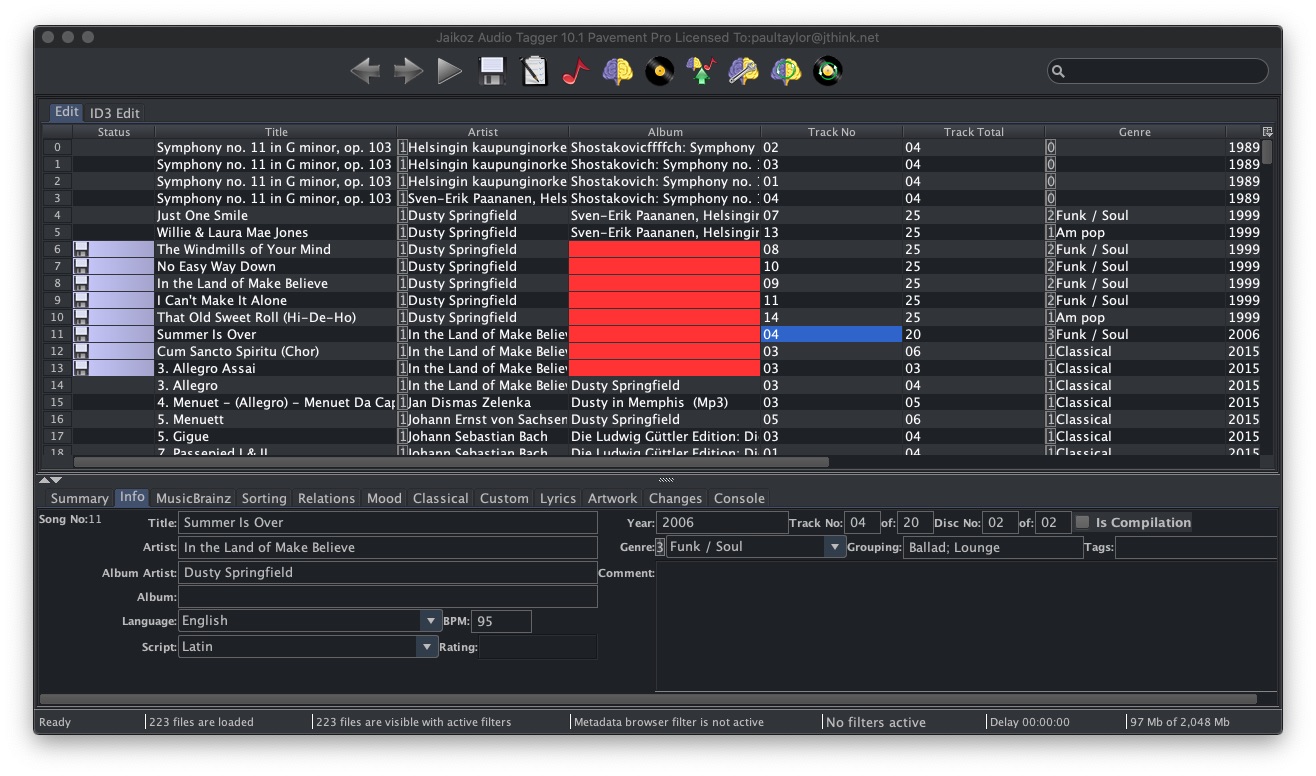
We now support Dark Mode

java11
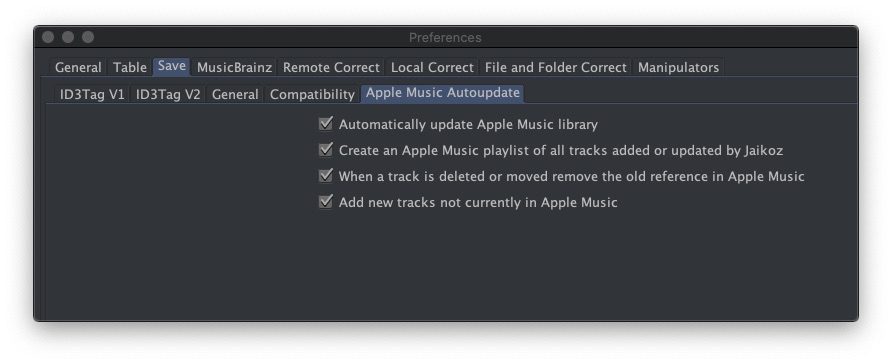
and Apple Music App


jaikozq11.2

and MacOS Notarization


Major Windows Changes

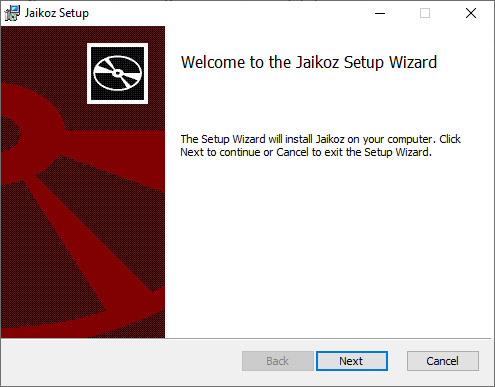
We now use a new installer, this is a much more robust installer that works better with Windows

http://www.jthink.net/jaikoz/images/windows/installer1.jpg

Metadata Tagging

New version of tagging library containing over forty fixes for reading and modifying audio files.

Java Changes

We have moved from Java 8 to Java 11, this provides many fixes and improvements delivered with Java 11. It also means that we can provide a smaller Java Runtime containing only the libraries that Jaikoz needs

Note Java 11 also means we no longer support Windows 32bit, since this is not available with Java 11

  • [JAIKOZ-1189] - OSX:Issue with About and Quit handler
  • [JAIKOZ-1202] - MacOS:Formatting of some Preferences tabs not quite right
  • [JAIKOZ-1215] - MacOS:Quit Handler Exception
  • [JAIKOZ-1218] - Removal of Lock on Save can cause problems with M4as because can use temporary files.
  • [JAIKOZ-1239] - Not respecting Only allow match if all songs on album are matched option when matching directly from MusicBrainz
  • [JAIKOZ-1249] - MacOS:Cannot configure Player app because chooser doesnt let you select Application folders
  • [JAIKOZ-1251] - Fixes for Music Tagging Library
  • [JAIKOZ-1265] - MacOS:iTunes Add New Tracks sometimes complaining nexttrack not defined

Improvement


  • [JAIKOZ-887 ] - Add way of marking Tracks as Instrumental
  • [JAIKOZ-1184] - OSX:Font size on detail panel only smaller than it used to be
  • [JAIKOZ-1237] - MacOS Mojave and later:Add Support for Dark Mode
  • [JAIKOZ-1252 1] - Update to Java 11
  • [JAIKOZ-1253] - MacOS:Add support for stricter MacOS Notarization controls
  • [JAIKOZ-1254] - MacOS:Add Support for Music app instead of iTunes
  • [JAIKOZ-1255] - Remove support for Windows 32bit version
  • [JAIKOZ-1257] - Build custom Java runtime with only the classes needed
  • [JAIKOZ-1262] - MacOS:Remove Cross-Platform option for MacOS
  • [JAIKOZ-1263] - Move to latest version of OneMusic Image Archive
  • [JAIKOZ-1264] - MacOS:Preferences:MusicBrainz:Format is not formatted correctly on MacOS

Friday, 24 April 2020

SongKong 6.9 Released - April 24th 2020

SongKong 6.9 Released - April 24th 2020

We are pleased to announce the release of SongKong 6.9 Mercury, named after the album by American Music Club released in 1993.

Java 8 to Java 11

In order to resolve various issues this new release now uses Java 11 instead of Java 8 , this was a major change that required alot of work behind the scenes.
It also means that:

  • There is no Windows 32bit version because does not exist for Java 11 onwards
  • SongKong is no longer compatible with Java 8, used by some linux users


Improvements for MinimServer and Classical

We have added some new options design for classical music customers using SongKong with MinimServer uPNP server.

Add Composer to start of Overall Work, this is used by MinimServer for indexing Classical Works
When using MinimServer uPNP server to play your classical music with the SongKong Classical profile enabling this option will show the composer as part of the work name in the Work index. This can be very usual for distinguishing between completely different works with very similar names written by different composers.

Add Composer to start of MinimServer Group, this is used by MinimServer for playing Classical Works
When you play a Classical work with MinimServer uPNP server enabling this option will show the composer when you play the group corresponding to the work. This can be very usual for distinguishing between completely different works with very similar names written by different composers. Because MinimServer only allows groups for work containing multiple contiguous movements enabling this option also includes adding the composer to title if the work has no movements.


Other Classical Improvements and Fixes

Classical compilations album could end up with unwieldy album titles if the Add Composer to start of Album Title options was used, so now we limit to use a maximum of three composers in the album title.


Improvements for Mp4 Processing

Before this release SongKong would sometimes have to use tmp files when modifying mp4 audio files, this could cause issues due to operating system permissions. Now we no longer need to use tmp files this is more reliable and quicker than the old

Monday, 3 February 2020

SongKong 6.8 Rumours - released January 31st 2020

Please to announce SongKong 6.8 Rumours now released


Mainly a bug fix release ,full details here


Tuesday, 26 November 2019

SongKong 6.7 Closer - released November 26th 2019


We are pleased to announce the release of SongKong 6.7 Closer, this release is named after the deeply dark second album by Salford band Joy Division. 


Improvements for MacOS 

This release contains some key improvements for Apple MacOS, especially the latest version of the operating system -  Catalina.                                                                                                                   

Notarization

With Catalina Apple added an additional security mechanism called Notarization. Essentially we have to send SongKong to Apple and it does an automatic scan for malware, only if it passes can customers install without a warning. SongKong 6.7 is notarized.


Apple Music App Support 

With Catalina Apple replaced the iTunes app with the Music app, you may not even have noticed because it looks very similar, the key difference being that movies have now been moved to a different TV app. However it Music is a different application and SongKong did not support it, now on Catalina we integrate with the Music app instead of the iTunes app if customer enables it.


Dark Mode

Since MacOS Mojave you can now select a Dark Appearance rather than the default Light Appearance, and this has become increasingly more popular, this had some effect on SongKong but did not work properly.

We have now added support for Dark Appearance to SongKong. If you select this then SongKong will start in Dark Mode, otherwise SongKong will start in the usual Light Mode. (Note, if you change appearance when SongKong is already started it will not switch SongKong appearance.)


Other Improvements

Not all improvements in this release are for MacOS, we also have added:

MusicBrainz Release without Type

Sometimes SongKong matches songs to a MusicBrainz release that has no release type such as Album, E.P or even Other. If this is the case we now default to Album


Roon Artist Credits Import

If you are using Roon, running SongKong over your songs first can greatly increases the number of albums that Roon identifies. It also means that Roon will display decent metadata for those albums it still cannot identify. With the recent Roon 1.7 this includes artist credits added by SongKong such as the musicians and their instruments. But Roon cannot handle instruments that contain curly brackets () such as drums(drumset) as added by MusicBrainz. So now we replace () brackets in the instrument with [] brackets and this resolves the problem.

See here for all improvements and fixes.


Wednesday, 23 October 2019

SongKong 6.6 Red - released October 23rd 2019

We are pleased to announce the release of SongKong 6.6, this release is named after the album by Taylor Swift. Red was the album that kickstarted her transformation from country singer to pop princess, crammed full of classic pop tunes.


Improved Reports 

Most of the improvements in this release are related to reports. 

Artwork Size

 
We now show the size of artwork (width in pixels) as another label on the image


Show Labels 

 
But you can remove this and all other labels by unchecking the Show Labels checkbox so you can see your artwork unobscured.


Text Search 

 
You can do a text search to only show the items that match the search.


Filters

 
And you can combine this with filters.

For the Artist page we can filter on artists that have/not an artist images, artists that have/not cover art for all their albums and artist that have/not all their albums matched to either a MusicBrainz or Discogs album.

New Browse Sections

We have added Browse by Artist and Browse by Folder to a Browse drop down menu because we have now added some new ways to browse your collection.

Browse by Album


Displays all the albums on a single page so that it is easy to find the album you are interested in regardless of knowing the album artist. It also means that very quickly you can see albums over your whole collection that need some attention.
 
Filters and search are included.


 Browse by Composer/Work

For classical music it is often more useful to be able to browse by the composer and their works, rather than by album artist and album so we have now added this. At the top level it shows all the composers that you have works for and you can select a composer to see their works
 
Filters and search are included. 


Bug Fixing

We have also fixed another seven bugs. Full list of fixes can be found on the news page

 
Jthink blog Jthink Facebook page google_plus Jthink YouTube channel Email Paul at Jthink Subscribe to Weekly Newsletter