Home User Forums SongKong Music Tagger Jaikoz Music Tagger Albunack Music Service

Sunday, 10 January 2016

Limiting long filenames when matching Classical releases

The Problem with Long Filenames


SongKong and Jaikoz both allow you to rename your music files based on their metadata, and this is an important step of keeping your music collection in sync. The total file length is guaranteed by both to be no longer than the maximum allowed on your OS, for example the maximum on Windows is the relatively low 259 characters

However you may want the maximum to be shorter than that, some of my PS Audio customers have alerted me to a couple of reasons why: 

1. Classical music matched to MusicBrainz can sometimes use a rather long value for the album field because editors shoehorn extra information into album title such as additional musicians involved as here:


or to capture additional details such as here:


According to the style guidelines this should not usually happen but sometimes it does
 

2. Some players such as JRiver Media Centre just do not like filenames this long

My proposed solution

So I added setting a user defined limit for the filepath length option to my list of improvements to make, this would simply truncate the filename if it was too long.

A Better Idea

But then another customer JazzNut came up with an even better idea, would it be possible to add this rule to the rename mask ?

Yes, of course - this is how I did it in SongKong

1. On the File Naming tab, set the Filename Masks dropdown so it is the same as your chosen rename mask, and open it up for editing by selecting the Edit button. 


2. Then use the length function to test the length of the album field, and the substring function to output a truncated version of the album field.

i.e (album.length>100 ? album.substring(0,100):album) to give new mask, then select OK  to save the changes.


3. Repeat the process to modify the compilation rename mask if this is different to the rename mask

You can use this approach to limit the length of any field, artist and title fields can get long as well, you can use the same approach in Jaikoz as well.


Tuesday, 15 December 2015

Finding the mood of a song


Finding the mood of a song

Playlists let us group songs in a way that is meaningful to use instead of the traditional approach of listening to songs album by album as directed by the artist. So many of us have large music collections these days that playlists are becoming increasingly more important way of categorising our music.

One way of categorising music is by considering the ambience or mood of the song. Clearly you would aim for a different ambience for a  romantic evening at home then for a house party!


Manual Mood Identification 

The original way to do this would be look at your songs and manually select them based on their mood. But its difficult to do this for most songs without actually listening to them, and most of us don't have time for this anymore.

Automatic Mood Identification

Its now possible to use computers to listen to the songs and extract various acoustic attributes, then by plotting multiple attributes against each other a mood can be worked out.One way of defined mood is by considering two acoustic attributes: Energy and Valence.

Energy

Represents a  measure of intensity and powerful activity released throughout the track. Typical energetic tracks feel fast, loud, and noisy. For example, death metal has high energy, while a Bach prelude scores low on the scale.

Valence

Describes the musical positiveness conveyed by a track. Tracks with high valence sound more positive (e.g., happy, cheerful, euphoric), while tracks with low valence sound more negative (e.g. sad, depressed, angry).


Combining these two on a graph is a strong indicator of acoustic mood,for example a song with high arousal and high valence could be defined as delighted, whereas one with high arousal and low valence could be defined as angry. Low arousal and low valence may be bored, but low arousal and and higher valence could be content. This methodology is used by companies such as Echonest for the Spotify site.

SongKongs way of doing things

SongKong Pro also uses the Energy/Valence algorithm, built on top of the data provided by  AcousticBrainz , these are the same guys who already provide BPM data. When a MusicBrainz song is identified by SongKong we can then lookup the acoustic attributes and calculate the mood. The mood is then stored in the standard mood metadata field so it is available to other applications.

Because the acoustic attributes have already been calculated for millions of songs your computer  doesn't have to actually analyse the song itself. This computationally hard work has already been done

Because the AcousticBrainz is already stored in the JThinkMusicServer we can get this information at the same as we get everything else, meaning no additional time is spent getting these new acoustic attributes.


We also add some other acoustic attributes that we will talk about more in another post


Friday, 20 November 2015

Adobe Lightroom or Photoshop - SongKong versus Jaikoz

Lightroom versus Photoshop

I have used Adobe Photoshop on and off for many years for photo editing. It is an incredibly powerful tool for photo-editing that offers limitless opportunities, but that is part of its problem. You can easily spend an afternoon working on a single photograph to get it perfect. And because I did not use it regularly often I did not use it in the most efficient cleverest way.

I also used Apple Aperture for managing my photographs but found it awkward to use not least because of the opaque library it uses in a similar way to how iTunes manages songs. But then I discovered Adobe Lightroom - at first it replaced Aperture offering a much clearer way of managing my photographs and making simple adjustments such as contrast and exposure and white balance. But then as I delved into it I found almost everything I used Photoshop for could be done in  Lightroom , and it was more obvious what to do and the results were often better.

One particular aspect of Lightroom that I love is that instead of having to use layers to ensure I dont modify the original photo I do not even have to think about it, Lightroom never modifies the original photograph instead all changes are written to its catalog and can be undone.

And I never have to think about working colour profiles either, I only have to worry about colour profiles when I export the photograph for use in another application or print.

I still use Photoshop because it can do things that Lightroom cannot, but most of the time I just Lightroom.


So why am I telling you this in the jthink blog ?

Firstly, I have just launched my Secret Dorset Photography website, would be great if you come and  took a look

Secondly, because the analogy between Lightoom and Photoshop is very similar to how I feel about SongKong and Jaikoz.

SongKong versus Jaikoz

Jaikoz development started in 2006 which coincidentally seems to be when Lightroom development began. But in this story Jaikoz is more analogous to Photoshop, from the start it has added manual editing and automatic matching . There are more than one way way to do some tasks and I have also been receptive to user enhancements requests to try and solve every possible problem. I think Jaikoz offers more comprehensive tagging than any other music tagger on the market.

But this complexity comes at the cost, although Jaikoz can be used simply this is not immediately apparent to users

SongKong is only two years old, the aim was to provide powerful automated matching with a clear workflow for the user. SongKong does not offer manual editing and never will, there are now many tools to do that. SongKong does not try to emulate all of the Jaikoz automated matching functionality just the most useful stuff.

For example MP3s support three versions of the ID3 tagging standard v22, v23 and v24, and Jaikoz supports saving with all three versions. But nobody uses v22 anymore, everything supports v23 and many applications now support v23. So SongKong just supports saving v23 and v24 we have lost a tiny bit of functionality for more simplicity, nobody has complained about this so far.

Now lets try to stretch the analogy to Photoshop layers . Unlike many other tag editor tools Jaikoz doesn't save changes as they happen instead everything is done in memory and can be reviewed before the modifications are saved. This is much safer but it does put the onus on the user to check the modifications, and can mean a delay if many file need to be saved at the end of an editing session.

With SongKong I wanted to remove this burden from the user, but just having SongKong making changes without the user having an opportunity to reverse the changes was dangerous. So instead all modifications are written to SongKongs database similar to the way edits are written to Lightrooms catalog. Unlike Lightroom the files are modified as well but because the changes are written to the database they can be undone at a later date, no problem.

These days my first point of call for cataloging my music is SongKong, I then use Jaikoz for songs that SongKong fails to match plus for special tasks such as exporting metadata to a spreadsheet.

Summary

For my photographs I need both Lightroom and Photoshop but I get much more use out of Lightroom. For my own music I need both SongKong and Jaikoz but songs always go through SongKong first.

Hope this helps with your decision making



Wednesday, 4 November 2015

What's the best lossless format?

What's the best lossless format?

Most of us know that generally lossless is better than lossy because it retains all of the audio and therefore sound better, and you can also convert form one lossless format to another without losing any sound quality. Lossless does require significantly more disk space but his doesn’t mean you have to reduce the amount of music stored on your iPod, iPhone or mobile device. For example iTunes allows users to convert higher data rate music files to 128kbps AAC on the fly as the music is synced to the mobile device in question. 

But what Lossless format should you choose ?

Currently there are four widely available choices:
  • Aiff
  • Wav
  • Apple Lossless
  • Flac

Wav

WAV is a music file format developed by Microsoft and IBM capable of storing Linear PCM audio (the digital encoding format used on compact discs) in completely uncompressed form. Ripping a CD and storing it as an uncompressed WAV results in “bit perfect” storage; the ripped music file is identical to the original CD data package. WAV files can also store high-resolution music files at greater bit depths and sampling rates than CD’s 16-bit/44.1kHz resolution. Uncompressed WAV files can be ripped and played back in iTunes and are very high quality. However, they do take up more hard drive storage space then lossless compressed formats such as Flac or Apple Lossless

WAV files originally did not support metadata, there is now defacto support using ID3v2 - the same format that is used by Mp3s. However not all players and tools currently recognize ID3v2 metadata in Wavs.

Aiff

AIFF was developed by Apple and is very similar to WAV. Again it is capable of storing uncompressed Linear PCM audio. Ripping a CD and storing it as uncompressed AIFF results in “bit perfect” storage with the ripped music file identical to the original data on the CD. Like WAV files, AIFF files can also store high-resolution music files at high bit depths and sampling rates. 

AIFF uses ID3v2 like Wavs and Mp3s. ID3v2 metadata is within Aiff is much more widely recognized - notably it is properly supported in iTunes.
 

Apple Lossless

This is a newer Apple file format option that employs lossless compression, which reduces the stored data to as little as half of the original music file’s size but restores bit-for-bit identical to the original music file on playback. The process is not unlike a zip file in which a large amount of data is “zipped” down to a smaller file size for storage and “unzipped” to its full size when opened.

There is discussion about whether uncompressed  music  files  such  as  WAV  or AIFF can sound better than lossless compression formats like Apple Lossless or FLAC because they don’t require the additional  step  of  being  “unzipped”  and  restored  to  their  original  PCM data package during real-time during playback, but this difference should only be noticeable in older and slower hardware.

Apple Lossless offers full metadata support using its own metadata format, this metadata format is also used by Apples lossy Advanced Audio Coding format. Both formats can be found using the .mp4 or or .m4a format which can be confusing

FLAC (Free Lossless Audio Codec)

FLAC is an open source lossless compression format similar to Apple Lossless Compression, this reduces the stored music file’s size, but then restores the data package bit-for-bit identical to the original music file on playback. It supports high-resolution audio with greater bit depths and sample rates and also supports metadata tagging using Vorbis Comments.

The main problem with FLAC is that although it is  an extremely common and accepted format, it is not supported by iTunes and Apple hardware such as the iPod.

Conclusions

 I would love to recommend the open source FLAC format but because of its poor support in the Apple ecosphere  I don't think it is currently the best choice, particularly since Apple punches above its weight when it comes to digital music.

Although Wav audio format is well supported, support for its metadata is poor so again I would not recommend Wav.

So we are left with two Apple formats. With Apple Lossless we get a smaller filesize and good metadata support, with Aiff we get a larger filesize but even better metadata. Both are well supported on Apple and non Apple hardware and software. The ID3v2 format used by Aiff format has been around a long time (because used by Mp3 as well)  and although it is a little unwieldy it is well understood and very powerful, the metadata format used by Apple Lossless is not as well understood or flexible.

Everybody circumstances differ but for me the current best choice is Aiff


Jaikoz 8.4.0 now with full Aiff and Wav support

 Jaikoz 8.4.0 now supports reading and writing metadata to Aiff and Wav formats !

Aiff and Wav Support 

Aiff and Wav formats each provide an uncompressed lossless format for your audio and were created in 1988 and 1991. However until more recently there was no agreed way to store anything but the bare minimum of metadata, this is why we originally didn't add support within Jaikoz. The other reason was these formats were expected to die out and be replaced with newer formats but although they are less prevalent then before this has not happened.

However we revisited these formats and discovered that defacto support for Aiff tagging and Wav tagging now existed using an ID3v2 chunk, just like MP3 files. Because they use ID3v2 they can now store all the metadata that Jaikoz finds such as artwork, composers, bpm and  MusicBrainz and Discogs identifiers - not just the basic metadata such as artist and album.

This also means you can edit your Aiff and Wav metadata not just with the Edit tab but also using the ID3 Edit tab. The ID3 Edit tab shows hows exactly how the fields are stored and also gives access to any additonal ID3 fields that are not mapped to a generic field in the Edit tab.


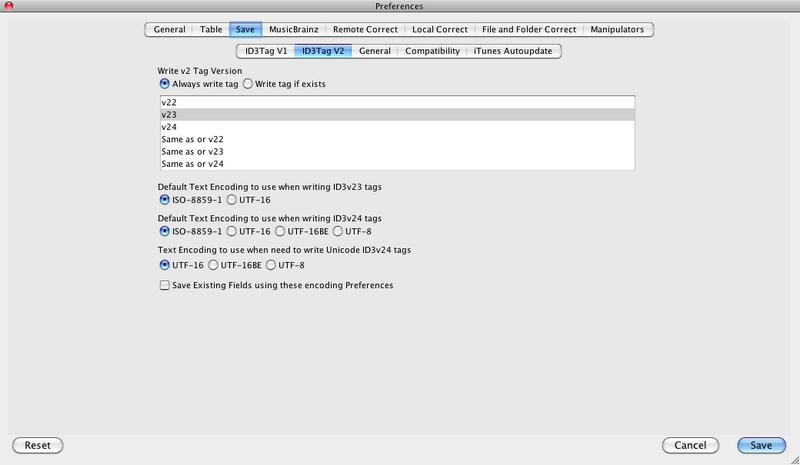
You can also decide on the ID3v2 format to use, by default they will use the value of Preferences:Save:ID3Tag V2:Write V2 Tag Version


But you can override this for any individual file by selecting a different value from the
Version column.


Single Song Matching

We also make some improvements to single song matching. Single song matching occurs when a song has been not been grouped with any others songs or no match was found for the group of songs and user preferences allow Jaikoz to try and match each song individually. Because only one song is being matched any album containing the song is a potential good match but we have made some changes to find a match for an original album rather than a compilation whenever possible.

Full list of fixes is as follows:

Bug

  • [JAIKOZ-1070] - Should not bother trying to do release metadata match unless have artist and release
  • [JAIKOZ-1079] - Saving Acoustids gets confused if filename has been modified but not saved
  • [JAIKOZ-1085] - Too many files exception when matching

Improvement

  • [JAIKOZ-290 ] - Add support for AIFF format (which might use ID3v2 format for metadata)
  • [JAIKOZ-1071] - When have no metadata single song matching do more to find track AND artist
  • [JAIKOZ-1074] - SingleSong match should first match by artist+title+release if have data
  • [JAIKOZ-1075] - SingleSong matcher should filter out Compilation acoustid matches
  • [JAIKOZ-1083] - Add support for Wav with RIFF
  • [JAIKOZ-1088] - Make artist and track search fuzzy match tracks

Tuesday, 13 October 2015

Aiff and Wav tagging now available

SongKong now supports reading and writing metadata to Aiff and Wav formats !

AIFF and WAV formats each provide an uncompressed lossless format for your audio, whereas Flac and Apple Lossless provide a compressed lossless format. Both types can encode your audio without losing any of the original data. An uncompressed format does not need to be uncompressed during playback, which can potentially result in smoother playback but at the expense of larger file sizes, however with most hardware it is unlikely you could detect any difference in playback . To confuse matters a little it is now possible to store compressed lossless in Aiff and Wav files as well - but this is rarer and not part of the original specification.

Audio Interchange File Format (AIFF) was developed by Apple Inc. in 1988 and is most commonly used on Apple Mac systems. Waveform Audio File Format (WAV) is a Microsoft and IBM audio file format standard for storing an audio bitstream on PCs developed in 1991. Both are version of the Interchange File Format (IFF) format developed by Electronic Arts back in 1985.

All formats provide a way of storing data in chunks - however until recently there was no agreed way to store anything but the bare minimum of metadata, this is why we never added support within Jaikoz. The other reason was these formats were expected to die out and be replaced with newer formats but although they are less prevalent then before this has not happened.

However we revisited this and discovered that defacto support for aiff tagging and wav tagging now existed using an ID3v2 chunk, just like MP3 files. Because they use ID3v2 they can now store all the metadata that SongKong finds such as artwork, composers, bpm and  MusicBrainz and Discogs identifiers - not just the basic metadata such as artist and album. Wavs can store metadata in an ID3v2 chunk and also some basic metadata in an INFO chunk: for maximum compatibility with older applications SongKong adds both an ID3v2 and a INFO chunk to files when they are saved.

After a period of development and testing support has now been added to SongKong 3.18 and this is available from today, plus as usual we have some matching improvements and some additional fixes.

Support for these new formats will be added to Jaikoz within a few weeks.

Tuesday, 8 September 2015

Jaikoz Automatic Music Tagger New version - 8.3.5

Just a small release (8.3.5) to fix some recently found bugs in Jaikoz with song identification
  • [JAIKOZ-1065] - Query by tracks needs an upper limit on how many tracks can be queries in one query
  • [JAIKOZ-1067] - Invalid attempt to get recordingId rather than trackId for Discogs check
  • [JAIKOZ-1068] - IsGoodArtist check not working well when comparing colloboration to one artist

Monday, 7 September 2015

Awesome song identification with SongKong 3.17

Over the Summer months we released new versions of Jaikoz, culminating with the ultimate song identification

Now we have put all those improvements into the latest version of SongKong - and we release it today, we have even squeezed in a few more improvements that are not yet in Jaikoz.

We have also had the Spanish and German in program translations reviewed and corrected by professional translaters, if you find any issues  just let us know.

Now we are really keen to get support for new audio formats and new features into both SongKong and Jaikoz over the coming months.

The full list of fixes can be found here

Thursday, 20 August 2015

Jaikoz 8.3.4 Released

We have just released Jaikoz 8.3.4

This release fixes an issue with Discogs matching plus two others:

[JAIKOZ-1009] - Export to xls exportsComent language for Xls causing problem for Import
[JAIKOZ-1059] - OSX:Error opening files in Finder with right-click unless Jaikoz already running
[JAIKOZ-1060] - Incorrect check being done for Discogs matches 


Sunday, 9 August 2015

We've done it:Ultimate Song Identification

A couple of months ago long time Jaikoz user Alfg reported song identification was not working as well as in the previous major version. We did some investigations and quickly found a couple of issues that increased the number of songs identified.

But there was still some songs that were in the MusicBrainz database and a few songs that were being misidentified. It got me thinking is it possible correctly identify every single song if its in the database, and not misidentify any.

It is a difficult tightrope to walk trying to identify more songs where there is not a clear answer, ensuring we do not misidentify songs, because this is worse than not identifying the song at all.

It has taken a few iterations but now with Jaikoz 8.3.3 for these particular tests we now have 100% correct matches and no mismatches for a series of essentially random folders.


I realize not all our customers will have such success but I think most of you will be very happy with the improvements we have made, now I need to incorporate some of these improvements into the next version of SongKong.

The improvements we made in this release are as follows:

  • [JAIKOZ-1043] - isGoodArtistAndTitleMatch failing artist which just has additional 'the' in name
  • [JAIKOZ-1044] - Single song match doesnt do release match if metadata has song title
  • [JAIKOZ-1047] - ManualCorrect isAcoustid checkbox is never set
  • [JAIKOZ-1048] - Discogs matching should enable track duration check
  • [JAIKOZ-1049] - Only allow recordings with same name AND SIMILAR DURATION to one with most sources
  • [JAIKOZ-1053] - Matching to multidisc release can fail to match disc 2 because false match on disc 1
  • [JAIKOZ-1054] - Simplify album names when trying to find releases by metadata
  • [JAIKOZ-1057] - Try harder to find artists when grouping songs that have no artist


Wednesday, 29 July 2015

More Jaikoz matching improvements with Jaikoz 8.3.2

Jaikoz 8.3.2 Released 

 Some more tweaking to the song identification algorithm plus fixing some recently discovered bugs and we have another new release:

Bugs

  • [JAIKOZ-0999] - Error with highlighter when drop folder into Jaikoz
  • [JAIKOZ-1037] - NullPointer with HighlightDuplicateMusicBrainzUniqueIds
  • [JAIKOZ-1039] - java.util.NoSuchElementException in ArtistTitle check
  • [JAIKOZ-1040] - OSX:Error copying album artwork directly from Google Chrome

Improvements

  • [JAIKOZ-1023] - What do do if tie and onlyUseRecordingWithMostSources enabled
  • [JAIKOZ-1029] - Ignore track duration check if track was already matched by Acoustid
  • [JAIKOZ-1034] - Double check songs by metadata only matches checking artist and title
  • [JAIKOZ-1035] - Increase artist/title check for single song metadata match

Friday, 17 July 2015

Not so perfect

Okay, a little regression slipped into the 8.3.0 release but now fixed and deployed in Jaikoz 8.3.1


  • [JAIKOZ-1033] - Artist/title double check for single song metadata matching is incorrect

The Perfect Song Matching Algorithm ?

The quest for the perfect matching algorithm continues, but we are certainly getting closer. With newly released Jaikoz 8.3.0 we have made many improvements to the matching process.

We now do more to groups songs correctly and find possible potential releases, such as searching for releases by track titles if no matches found by release title.

And we are now stricter about accepting a match, we have added some additional checks to ensure it really is a good match.

So the match rate is now higher, and at the same time incorrect matches are kept to a minimum.


  • [JAIKOZ-773] - Allowing Acoustid matches when metadata exists but is bad
  • [JAIKOZ-1005] - If artist name contains feat and get no matches strip out and try again
  • [JAIKOZ-1007] - When single song matching against Acoustid ensure we are selecting the correct song
  • [JAIKOZ-1013] - Dots not removed from filepath when after path separator
  • [JAIKOZ-1014] - When disc has more than two discs may not match because can match songs to wrong disc
  • [JAIKOZ-1018] - Ignore join phrased when matching artists
  • [JAIKOZ-1020] - Consider artist name when doing track scoring
  • [JAIKOZ-1022] - Always only use recording with most sources when single song matching
  • [JAIKOZ-1024] - Extend Acoustid title check to an artist check
  • [JAIKOZ-1026] - Additional processing when songs organized one folder per artist
  • [JAIKOZ-1027] - Search by metadata should search by artist and tracks if no match on release

Thursday, 9 July 2015

Better song identification with Jaikoz 8.2.5

In this release we have spent some time working out why some songs by Jaikoz do not get matched even though they exist in the Albunack database and we found a few bugs and improvements we could make.

  • [JAIKOZ-1003] -         Single song matching only matching by acoustids
  • [JAIKOZ-1004] -         Single song matching by Acoustid should only use recording with most sources
  • [JAIKOZ-1005] -         If artist name contains feat and get no matches strip out and try again
  • [JAIKOZ-1010] -         Unable to create fingerprints on Windows if filepath greater than 260 characters

So now you should get an even better matching rate with Jaikoz, already we believe have the most sophisticated and accurate matching algorithm out there, if you know any different let us know.

       
Jthink blog Jthink Facebook page google_plus Jthink YouTube channel Email Paul at Jthink Subscribe to Weekly Newsletter